


FAQs Mobile Deposit (DeposZip)
Important information about Mobile Deposits
FAQs for Mobile Deposit (DeposZip)
Q: Are there any fees for using DeposZip Mobile?
A: DeposZip is a free service. Return check fees still apply.
Q: When will my funds be available when using DeposZip?
A: Funds deposited into accounts may not be available for immediate withdrawal in cash, or to pay checks, debits or other withdrawals from the account. The length of delay varies depending on the type of deposit and is counted in business days (everyday, except Saturdays, Sundays, and holidays) from the day of deposit.
In Most (but not all) cases, the funds from the deposit will be available:
Next Day Availability
(1st Business Day after Deposit)
- U.S. Treasury Check (payable to you)
- First $200 of total deposit for local checks
2nd Business Day after Deposit
- Local Check - All U.S. (non-foreign) checks payable to you that are not listed with "Next Day Availability"
- State or local government check (payable to you)
- Cashier's, certified, or teller's check (payable to you)
- Reserve Bank check, Home Loan check (payable to you)
Q: Do I qualify for DeposZip?
A: Accounts must be in good standing. Other qualifications may apply.
Q: How should I endorse the check when using DeposZip?
A: The following items must be present on check:
- The words "Mobile Deposit" should be above the Signature(s).
- Signature(s) of all payees should be included.
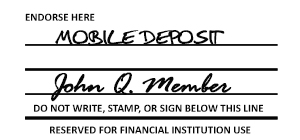
Note: Use mobile deposit check box if available on back of check.
Q: What checks are not accepted using DeposZip?
A: The following will not be accepted:
- Any item drawn on your account
- Any check previously returned
- Any item that is stamped with a “non-negotiable” watermark
- Any item that contains evidence of alteration to the information on the check
- Any item issued by, payable by, or payable through a financial institution in a foreign country
- Any item that is incomplete
- Any item that is “stale dated” or “post-dated”
- Savings Bonds
- Traveler’s Checks
- Credit Card Checks
- Any check issued by a “Pay-Day Lender” or any other person or entity, in which your endorsement constitutes a loan contract
- Any money orders
- Any items previously deposited whether electronically, remotely, or in person
Q: Are there deposit limits to use DeposZip?
A: Per check, daily, and monthly limits apply.
See Terms and Conditions for more details.
Q: When can I expect credit in my account?
A: Deposits are reviewed twice each business day. Before 12PM deposits will have same day availability, deposits after 12PM may be subject to next day availability.
Q: How are limits determined?
A: Members typically receive the default limit. Higher limits will be considered for approval by Red River Credit Union and based on past check deposit history. A lower limit may also apply based on account and check deposit history.
Q: How many checks can a member deposit in a day?
A: There is no limit on the number of checks, as long as the total does not exceed the per day limit.
Q: What causes a Preprocessing Failure or Fault after taking a picture of check?
A: There are several reasons a member may get a Preprocessing Failure including the written amount line is not legible (specifically on hand-written checks), the image is not clear, the account number/routing number is torn/marked through, or the item is not recognized as a check.
Q: How many times can a member attempt to take an image of a check?
A: Members may take as many pictures of the check as needed to process the item. Any item duplicated (deposited more than once) will be considered fraud and the service disabled.
Q: If I have a question concerning Online Banking, where can I go to receive help?
A: To receive help troubleshooting our Online Banking Service, you can call the Phone Center at 903-735-3000 or send us a message through your Online Banking. Send us a message or Chat with a Virtual Branch Representative.
Q: How will I know if my deposit was received?
A: Communication will be sent via the email address we have on file. To confirm your email address is correct, log in to your online banking. Once you’re logged in, hover over your home banking menu option and select change email address.
To receive help troubleshooting our Online Banking Service:
- call the Phone Center at 903-735-3000 or 800-822-3317
- send us a message through your Online Banking. Send us a message or Chat with a Virtual Branch Representative.