
Digital Services
Making your life easier, one service at a time.
Skip the Teller Lines
Take control of your finances with Red River Credit Union's convenient online banking services that empower you to manage your money when and how it works best for you. With a wide range of tools at little to no cost*, you'll save time and money, freeing you up to focus on the things that matter most. Here's what you can access:
- 24/7 Account Access: Check balances, view transaction history, and transfer funds anytime, anywhere.
- Bill Pay Services: Quickly and securely pay your bills online without the hassle of writing checks or visiting multiple websites.
- Mobile Banking App: Manage your accounts on the go with features like mobile deposits, account alerts, and quick transfers.
- eStatements: Go paperless and stay organized with electronic statements that are easily accessible and environmentally friendly.
- Budgeting Tools: Track spending, set savings goals, and monitor progress with integrated financial planning tools.
- Alerts and Notifications: Stay informed with real-time updates on account activity, due dates, and low balances.
- Person-to-Person Payments: Send money to friends, family, or anyone else quickly and securely with P2P services.
- Loan Applications: Apply for loans or credit lines online without needing to visit a branch.
- Secure Online Messaging: Communicate with customer service securely through your online banking portal.
Sign up today and experience the flexibility, efficiency, and peace of mind that comes with managing your finances on your schedule. RRCU makes banking simple and affordable, so you can focus on achieving your goals.
See What's Available
-
Digital Options
Online Banking allows you to access your accounts and manage your money while relaxing at home, traveling on vacation, or working at the office. Enjoy all the benefits by signing up for Online Banking through an ID and password secured platform. Online Banking is safe, private, convenient, and free for Red River Credit Union members. Available services include:
- Check Account Balances
- Transfer funds between your accounts or Member-to-Member (M2M)
- Perform remote account transfers1
- Pay Bills2
- Make loan payments
- Review transaction history
- View images of cleared checks
- Set up Alerts and Notifications
- Mobile Wallet (Apple/Google/Samsung)
- Sign up for eStatements
- eSignature3 (Remote Signature Approvals)
1Fee of $2.00 per transfer to an external financial institution. Some restrictions apply to transfer services.
2Fee applies to Rush Delivery service
3Some restrictions apply to eSignature. -
Banking App
Enjoy the security of Online Banking with the convenience of an app. Popular features include:
- Mobile Check Deposit (DeposZip)
- Pay Bills*
- Check Account Balances
- Review Transaction History
- Local and Remote Account Transfers
- Make Loan Payments
![App Store Icon]()
![Google Play Icon]()
Security Features
Red River Credit Union Mobile Banking is protected with TLS encryption, the same security protection used when logging into online banking from a web browser on a computer.- Password and security questions are required to login.
- Inactivity time-out period.
Requirements
You must be a current Red River Credit Union member and signed up as an active user of Red River Credit Union Online Banking. Click here or contact us if you are not setup for Online Banking.*Fee applies to Rush Delivery service.
-
Bill Pay (Online/Mobile)
Online and Mobile Bill Pay with Bill Discovery
Bill Pay
- FREE: No cost service*. Saves money spent on checks, stamps and envelopes. Unlimited number of Bill Pay transactions.
- Convenience: Be in control of when your bills are paid by scheduling recurring payments so they will post automatically. Pay select companies electronically for faster processing.
- Peace of Mind: Review past payment history for any payee. Create personal financial reports.
- Secure: View bills from select companies online with bill presentment. No chance of checks written being stolen from mailboxes.
*Rush Delivery Option: For last minute payments, a Rush Delivery option is available. Fee rate is disclosed when Rush Delivery service is selected.
Bill Discovery
It’s simple. Bill Discovery removes the friction and manual process of adding bills to your Online Bill Pay account. Click Here to learn more about how Bill Discovery works.
It’s smart. After you provide your initial consent, Bill Discovery will identify from our biller network what bills are available for the customer to pay!
It’s fast. Once you select from recommended bills, payment details are immediately added to your Online Bill Pay account where you can update your payment details at anytime.
Security Recommendations
- If your mobile device becomes lost or stolen, access your account by logging into online banking using a computer and change your password immediately. You may also contact us during normal business hours at 903-735-3000 to change your password.
- Never store passwords on your smartphone. It's always best to commit these security details to memory and not record them anywhere, this includes applications that remember them automatically.
- Setting up a password to access your smartphone is always recommended to protect your phone if it gets lost or stolen.
- Do not download applications from untrusted sources. Criminals use infected documents and applications to spread their malware and compromise victim's smartphones. Never open an attachment or download an application from a person or website that you don't know or have doubts about.
-
Account Transfers
Account Transfers
Account transfers let you move money within your member number and to other members.
- Move money to/from any account
- Pull money from your Line of Credit
- Make a loan payment
- Pay credit card
- Make recurring or schedule for a later date
- Easy to set up. Secure. Convenient.
Remote Transfers
Remote transfers allow you to send/receive money from another institution. You will need to verify your account through small penny transactions.
- Pull money from another institution, RRCU fee free
- Send money to another institution for only $2 per transaction
- All accessible through your RRCU Online or Mobile Banking sign on
- Make recurring or schedule for a later date
- Easy to set up. Secure. Convenient.
-
Mobile Check Deposit
Aim. Click. Deposit.
Only available in our Mobile App. Deposit your checks on the go, wherever you go, with RRCU “DeposZip” Mobile Check Deposit. DeposZip enables members to make deposits by using their supported smartphone or tablet to capture photos of the front and back of a check and submit for deposit.
This service is available for eligible* RRCU members who are enrolled in Online Banking. Checks can be deposited into your RRCU Checking, Savings, or Money Market account.
Some restrictions and limitations apply. See Terms and Conditions for details.
How does it work?
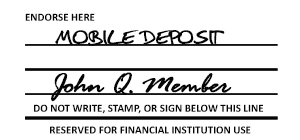
- Sign and write "Mobile Deposit" on the back of check
- Choose your Deposit Account
- Take a picture of your check
- Tap Submit
To get started, CLICK HERE for instructions for Apple and Android devices.
How should I endorse the check when using DeposZip?
The words "Mobile Deposit" should be above the Signature(s). Or, check the box for Mobile Check Deposit.
Signature(s) of all payees must be included.![Mobile Deposit Example]()
What checks are not accepted using DeposZip?
- Any item drawn on your account
- Check previously returned
- Item stamped with a “non-negotiable” watermark
- Item that contains evidence of alteration to the information on the check
- Item issued by, payable by, or payable through a financial institution in a foreign country
- Anything that is incomplete
- “Stale dated” or “post-dated” items
- Savings Bonds
- Traveler’s Checks
- Credit Card Checks
- Check issued by a “Pay-Day Lender” or any other person or entity, in which your endorsement constitutes a loan contract
- Money orders
- Any item previously submitted for deposit whether electronically, remotely, or in person
If I have questions, where can I go to receive help?
To receive help troubleshooting the DeposZip product, you can call the Phone Center at 903-735-3000 or send us a message through your Online Banking.
-
Mobile Wallet (ApplePay, GooglePay, SamsungPay)
Apple Pay / Google Pay / Samsung Pay
Make secure purchases in stores, in apps, and on the web using your RRCU debit card in your Mobile Wallet. Use the app specific to your device and follow the in-app instructions to add your RRCU debit card. Get started using Apple Pay, Android Pay or Samsung Pay today!
Look for this sign when paying in stores:
![Mobile Payment Symbol]()
Apple Pay
![ApplePay Icon]()
Apple Pay is quick to set up, easy to use and works with your iPhone. Pay with your RRCU debit card with just a touch. And because your card details are never shared by Apple when you use Apple Pay, making payments with your iPhone, Apple Watch, iPad, and Mac is the safer, more private way to pay.
How to set up Apple Pay? For iPhone, go to your Wallet app to add your RRCU debit card to Apple Pay. Follow the directions to activate your account.
Where can you use Apple Pay? CLICK HERE to go to apple.com for the latest list of locations.
Google Pay
![GooglePay icon]()
You already use your phone for just about everything. Now you can pay with it, too. Just add your RRCU debit card and start shopping in stores, in apps, and online. It's easy to set up and easy to use. Discover all the benefits in using the Android Pay at https://pay.google.com/about/.
How to set up Google Pay? For an Android Phone, click the icon above, download the free Android Pay app and follow the directions to add your RRCU debit card.
Where can you use Google Pay? Click Here to go to pay.google.com for the latest list of locations. to go to pay.google.com for the latest list of locations.
Samsung Pay
![SamsungPay Icon]()
Samsung Pay lets you carry your RRCU debit card on your Samsung devices. All you have to do is tap to check out. Keep your favorite RRCU debit card at the top of your mobile wallet. Learn more at samsung.com/us/samsung-pay.
How to set up Samsung Pay? For Samsung Pay, click the icon above, download the free app and follow the directions to add your RRCU debit card.
Where can you use Samsung Pay? Click Here to go to samsung.com for the latest list of locations. to go to Samsung.com for the latest list of locations.
Mobile Wallet Terms and Conditions
CLICK HERE for Mobile Wallet Service Terms and Conditions.